If you have spent any significant time studying modern poker strategy, you have undoubtedly heard the term “solver.” For a long time, the industry standard was dominated by massive, computationally heavy software like PioSolver. However, a new player has entered the arena: GTO+.
As someone who has spent hundreds of hours running equilibrium calculations to refine my 6-max cash game ranges, I wanted to see if GTO+ could actually deliver professional-grade results without requiring a NASA-grade supercomputer. In this review, we will dive deep into the functionality, speed, and usability of GTO+.
What is GTO+? Understanding the Fundamentals
GTO+ is a poker solver designed to calculate Nash Equilibrium strategies for various poker scenarios. Unlike some competitors that focus solely on pre-flop ranges, GTO+ specializes in post-flop play. It allows users to input specific board textures and betting sequences to see how an “unexploitable” strategy would behave.
When I first booted up the software, I was struck by its minimalist interface. There are no flashy 3D graphics or distracting animations. It is a pure, utility-driven tool designed for one thing: calculating GTO (Game Theory Optimal) frequencies.
Personal Testing: Putting Gemma’s Hands to the Test
To truly evaluate this software, I didn’t just look at the manual; I ran my own simulations. I set up a standard single-raised pot scenario on an Ace-high flop texture.
What impressed me immediately was the computational efficiency. While older solvers would make my laptop fans sound like a jet engine for hours, GTO+ utilized my CPU cores with remarkable precision. The “CFR” (Counterfactual Regret Minimization) algorithm used by GHT+ is optimized to find near-equilibrium solutions much faster than I previously thought possible on consumer-grade hardware.
However, it isn’t perfect. During my testing, I noticed that if you set the precision levels too high without sufficient RAM, the software can become sluggish. It requires a “sweet spot” of settings to ensure you aren’t waiting an eternity for a single hand iteration.
Key Features and Real-World Performance
When evaluating a poker solver, the features are what separate the hobbyist tools from the professional essentials. Here is how GTO+ performs in practice:
1. Post-Flop Tree Construction
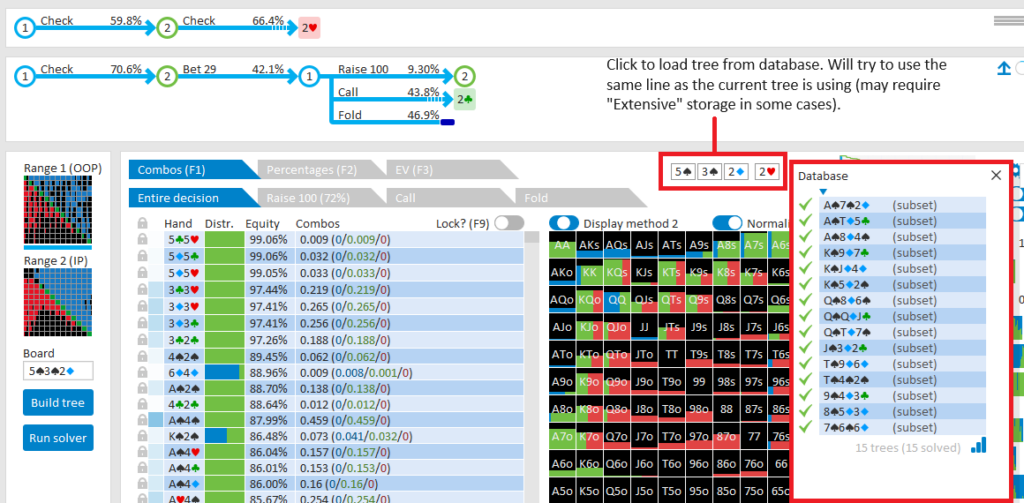
The core of any solver is the ability to build “betting trees.” This is where you define the action (Check, Bet, Raise, Fold).
- Real-World Use: I used this to analyze a specific bluffing frequency on a coordinated board. The interface for building these trees is intuitive, though it does have a learning curve if you aren’t familiar with how solvers interpret bet sizing.
2. Range Input and Customization
You can input any range imaginable. Whether you are studying a specific opponent’s 3-betting range or your own defending range from the Big Blind, GTO+ handles the math flawlessly.
- Performance Note: The software is incredibly precise with range weights, allowing for highly granular study sessions.
3. Visual Heatmaps and Strategy Visualization
The output isn’t just raw data; it’s visual. You see the “heat” of the bets—where the equilibrium suggests a high frequency of checking versus betting.
Pros and Cons: The Honest Truth
No software is perfect. To help you decide if GTO+ is worth your investment, I have broken down the advantages and disadvantages based on my hands-on experience.
Pros
- Extreme Speed: For a lightweight solver, the calculation speed is industry-leading for its price point.
- Affordability: It offers professional-grade equilibrium calculations at a fraction of the cost of “heavyweight” solvers.
- Low Hardware Requirements: You don’t need a $5,000 workstation to run basic simulations effectively.
- Intuitive Visuals: The way it displays betting frequencies makes it easy to spot patterns in optimal play.
Cons
- Learning Curve: If you are new to the concept of “betting trees,” the initial setup can feel overwhelming.
- No Pre-flop Focus: While it handles post-flop brilliantly, it isn’t a dedicated pre-flop range builder like some other specialized tools.
- UI Simplicity: Some users might find the interface a bit too “bare-bones” compared to modern software.
Feature Breakdown: How GTO+ Handles Complex Scenarios
| Feature | Performance Level | Best For… |
|---|---|---|
| CFR Algorithm | High Efficiency | Rapidly finding near-equilibrium solutions. |
| Tree Builder | Moderate/Intuitive | Defining complex multi-street betting actions. |
| Range Importer | Seamless | Importing .txt or .csv range files for study. |
| Heatmap Analysis | Excellent | Visualizing optimal bluffing and value frequencies. |
The Verdict: Should You Buy GTO+?
After extensive testing, my conclusion is clear: GTO+ is an essential tool for the serious poker student.
Who is this product best for?
- The Intermediate Player: If you are looking to move beyond “gut feeling” and start studying mathematically sound frequencies, GTO+ provides the most bang for your buck.
- The Professional Grinder: For those who need to run quick simulations on specific board textures during study sessions without breaking the bank.
- The Budget-Conscious Student: If you want the power of a solver but cannot afford the high subscription fees of larger enterprise software.
Who should skip it?
- Complete Novices: If you don’t yet understand the basics of pot odds or range construction, the technical nature of GTO+ might feel like overkill.
Final Thought: GTO+ manages to strike a rare balance between power and accessibility. It is a specialized instrument that, when mastered, can significantly sharpen your edge at the poker table.
Try GTO+ Today
Ready to take your game to the next level? Click below to get started with GTO+:
Visit GTO+ Official Website →
Disclosure: This post contains affiliate links. If you click through and make a purchase, we may earn a commission at no extra cost to you. We only recommend tools we genuinely believe will help improve your game.