If you have spent more than an hour studying modern poker, you have likely heard the name Flopzilla. In the era of massive computational power and complex GTO (Game Theory Optimal) solvers like PioSolver or MonkerSolver, many players wonder: Is a flop texture analyzer even necessary anymore?
I remember sitting in a local card room three years ago, struggling to understand why my C-betting range was getting punished on low, connected boards. I didn’t need a complex tree-based solver; I needed to understand how ranges interact with specific textures. That is where Flopzilla changed the game for me.
In this comprehensive Flopzilla review, we will dive deep into whether this tool remains an essential part of your poker study toolkit or if it has been rendered obsolete by the new age of solvers.
What is Flopzilla? Understanding the Core Concept
At its heart, Flopzilla is not a “solver” in the traditional sense. You won’t find it calculating complex equilibrium strategies for every street. Instead, think of it as a highly advanced range interaction simulator.
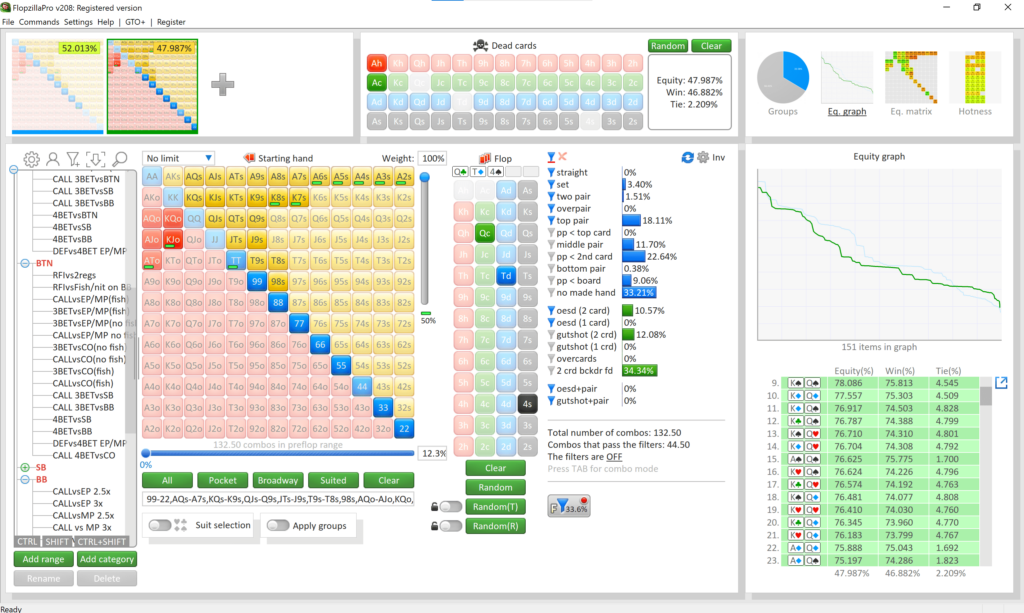
Flopzilla allows you to input specific ranges (Pre-flop ranges, 3-betting ranges, etc.) and see exactly how those ranges hit various flop textures. It calculates:
- Equity distribution: How much equity does Range A have against Range B?
- Hand strength frequency: How often does a range flop top pair, sets, or draws?
- Nut advantage vs. Range advantage: Who actually holds the “stronger” hand on this specific board?
The Feature Breakdown: Testing Flopzilla in Real-World Scenarios
To provide an honest assessment, I put Flopzilla through several rigorous testing scenarios to see if its data holds up under pressure.
1. Range Interaction Analysis
The primary function of the software is analyzing how a range interacts with a board. When I input a standard UTG opening range and test it against a BB defending range on an A−7−2 rainbow flop, Flopzilla provides a precise breakdown of the “nut advantage.”
Real-world performance: This is where the tool shines. It allows you to see that while the BB might have more “two pair” combinations, the UTG player holds all the sets and top-range Aces. Seeing this visually helps solidify your understanding of range advantage in a way that spreadsheets simply cannot.
2. The “Flop Texture” Simulator
One of the most powerful features is the ability to see how often certain types of boards appear. If you are studying how to play against “low, connected” boards, you can use Flopzilla to understand the frequency of these textures.
3. Custom Range Inputting
Unlike simpler tools, Flopzilla allows for incredibly granular range construction. You can input specific combos, which is vital when you are trying to study a specific hand history where an opponent 3-bet you with A5s and KK.
Pros and Cons: The Honest Truth
No piece of software is perfect. After hundreds of hours of usage, here is my breakdown of the good and the bad.
Pros
- Unmatched Visual Clarity: The way it displays equity shifts is incredibly intuitive for visual learners.
- Lightweight & Fast: Unlike heavy solvers that require massive RAM, Flopzilla runs smoothly on almost any laptop.
- Educational Value: It teaches you why certain boards are better for certain ranges, rather than just telling you what to do.
- Affordability: Compared to the high subscription costs of modern GTO solvers, Flopzilla is a one-time purchase that offers immense value.
Cons
- Not a Full-Game Solver: It won’t tell you exactly how many chips to bet on the turn or river; it only tells you the equity of the ranges.
- Learning Curve: The interface, while powerful, can be slightly intimidating for absolute beginners.
- No Post-Flop Strategy Automation: You have to do the “thinking” part yourself based on the data provided.
Flopzilla vs. Modern GTO Solvers: Do You Need Both?
This is the most common question I get from students. Can Flopzilla replace PioSolver?
The answer is a resounding no—you need both.
A solver like PioSolver tells you the optimal frequency of your actions (e.s., “Bet 33% pot with 100% frequency”). However, Flopzilla tells you the composition of the ranges. If you don’t understand the range interaction (Flopzilla), you will never truly understand why the solver is telling you to bet a certain way (PioSolver).
I use Flopzilla to build my “intuition” and PioSolver to refine my “execution.”
How to Use Flopzilla for Effective Poker Study
To get the most out of this tool, I recommend the following workflow:
- Identify a Problem: Find a hand in your history where you felt lost on a specific flop.
- Reconstruct the Ranges: Input the exact ranges used in that hand into Flopzilla.
- Analyze the Equity: Look at how the “nut advantage” shifted. Did you realize the opponent had more sets?
- Verify with a Solver: Once you understand the texture, use a solver to see the optimal betting lines for those ranges.
The Verdict: Is Flopzilla Worth Your Money?
After extensive testing and integration into my daily study routine, here is my final recommendation.
Flopzilla is best for:
- Intermediate players looking to deepen their understanding of range advantage and board texture.
- Serious students of the game who want a visual tool to complement GTO solvers.
- Coaches who need a way to demonstrate range interactions to students clearly.
Skip Flopzilla if:
- You are an absolute beginner who hasn’t yet mastered basic hand rankings and pot odds (you’ll be overwhelmed).
- You only want a tool that gives you “the answer” without requiring any analytical thought.
Final Thought: In a world of increasingly complex poker technology, Flopzilla remains a foundational pillar. It is the bridge between “guessing” how ranges interact and “knowing” exactly how they collide.
Try Flopzilla Today
Ready to take your game to the next level? Click below to get started with Flopzilla:
Visit Flopzilla Official Website →
Disclosure: This post contains affiliate links. If you click through and make a purchase, we may earn a commission at no extra cost to you. We only recommend tools we genuinely believe will help improve your game.