The quickest free way to check a poker probability — and a useful first step into the arithmetic of the game.
This review is based on official product information and published third-party sources, verified as of 18 October 2026. No hands-on testing was performed for this report.
Review summary
The PokerNews Texas Hold’em Odds Calculator is a free tool that runs in your web browser. You pick your cards and your opponent’s cards (or the board situation), and it calculates the probability of your hand winning or improving.
Its strength is friction: nothing to install, no account, no licence. If a question comes up while you are reading a hand or watching a broadcast, the answer is a few clicks away. Its limit is depth — it is a simplified calculator for specific-hand comparisons, not a full range-analysis environment, and it has no strategic output at all.
Verdict: the quickest free way to check a poker probability, and a useful first step into the maths for newer players.
Quick facts
| Feature | Details |
|---|---|
| Software name | Texas Hold’em Poker Odds Calculator |
| Developer | iBus Media Limited (PokerNews) |
| Product category | Web-based poker odds/equity tool |
| Official website | pokernews.com |
| Windows compatibility | n/a (browser-based) |
| macOS compatibility | n/a (browser-based) |
| Linux compatibility | n/a (browser-based) |
| Mobile support | Yes, via a mobile browser |
| Supported poker variants | Texas Hold’em |
| Main functions | Win probability and equity for hand-versus-hand situations, preflop through postflop |
| Free version or trial | Free |
| Pricing model | Free to use |
| Current price (verified 18 Oct 2026) | Free |
| Latest version | n/a (web-based service) |
| Last verified date | 18 October 2026 |
What is the PokerNews Odds Calculator?
It sits in the “Poker Tools” section of PokerNews, a long-established poker publication (operated by iBus Media Limited, on the web since 2003). The calculator is the site’s quick-maths utility for Texas Hold’em.
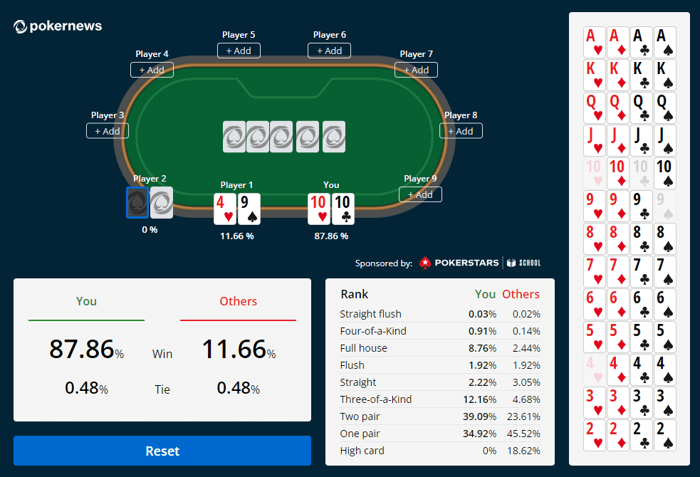
The basic operation: select your two hole cards (the cards dealt to a player) and your opponent’s cards — or a placeholder for unknown cards — plus any board cards that have been dealt (the flop, turn and river). The tool then works out the probability of your hand winning, or of improving, given the current state of the game.
“Equity” is the term poker players use for that probability expressed as a share of the pot: if you win 60% of the time, your equity is 60%. The calculator provides these percentages, and — as the official page describes it — analyses your hand, the game state and potential opponent hands to give you the odds.
Because it lives in a browser, there is nothing to maintain: no updates to install, no licence to manage, no hardware beyond a working connection.
Who should use it?
Beginners This is where the tool earns its keep. Many new players have a feeling that a flush draw “should” hit about one time in four but cannot actually check it. Entering your cards and the board and seeing the real percentage builds that intuition properly. It is also a safe place to explore pot odds — comparing the price of a call with your chance to win — without money involved.
Intermediate players A fast verification tool: you have an answer in your head, the calculator tells you whether it was right, in seconds. Repeated over study sessions, that loop is how the common probabilities become automatic.
Advanced players and coaches Too basic for primary study — professionals work in ranges and solvers — but fine as a sanity check, or for demonstrating a basic probability to a student without the overhead of desktop software.
Cash and tournament players The underlying equity maths is the same in both; note that for tournament decisions where chip value matters, an ICM tool (such as ICMIZER 3) is the correct instrument, not an equity calculator.
Main features
Hand-versus-hand probability The core function: your cards against your opponent’s known cards, or against unknown (random) cards, with or without board cards. Preflop, flop and turn all work — you add the cards that have been dealt and the probabilities update.
Win and improvement odds Beyond raw equity, the tool helps answer “what are the chances of this hand improving?” — for example, the odds of a draw completing by the river. The official page frames the tool as analysing the current state of the game, your hand and potential opponent hands to provide odds.
No setup, no account The entire interface is card selection and reading percentages. There is no configuration, no database, no profile.
Limitations It is a simplified, specific-hand calculator: you compare defined hands rather than modelling full range-versus-range interactions, and it gives no strategic guidance — the odds, not the decision. It is Texas Hold’em only, and it needs a browser and a connection.
Ease of use
About as easy as a web tool gets. Pick your cards, pick your opponent’s cards (or leave them unknown), add board cards as the hand develops, and read the percentages. The visual card selection means there is no syntax to learn and little room for input error.
That simplicity is the design intent: it optimises for the ten-second question, not the hour-long study session.
Practical examples
Scenario A: The flush draw You hold two hearts, the flop brings a third, and you want to know the real chance of making the flush by the river. Enter your hand and the board: the percentage appears instantly, and you can immediately compare it with the price of a call (that comparison is pot odds).
Scenario B: Overcards on a low board You hold ace-queen on a 7-5-2 flop, with no pair. Your equity against a hand that has already paired is lower than it feels — entering the situation shows exactly how much lower, and how the odds improve as your outs (the cards that help you) work against the remaining deck.
Scenario C: The coin flip Pocket eights against ace-king is the classic example: the calculator shows the pair holding a healthy lead preflop, and how that lead changes once community cards appear. It is the fastest way to make “who is favoured” precise.
Performance and system requirements
It runs in any modern web browser — Chrome, Firefox, Safari or Edge — on a desktop, laptop, tablet or phone. There is no installation and no formal specification; a working internet connection is the only requirement. On a small phone screen the card-picker needs a bit of care, but the tool itself has no resource demands.
Pricing and value
Free, with no subscription tiers and no account.
The value is in the absence of friction: it is the lowest-effort way to answer a probability question, which is exactly what a free browser tool should be. The moment your questions start involving full ranges or strategy, you will outgrow it — but for the entry-level maths of poker, it costs nothing and works anywhere.
Advantages and disadvantages
Advantages
- Completely free, no account, no installation.
- Instant access on any device with a browser.
- Simple, visual card selection.
- From a long-established, reputable poker publication.
- Good for building basic equity and pot-odds intuition.
Disadvantages
- Specific-hand comparisons only — no deep range-versus-range modelling.
- No strategic or frequency output.
- Texas Hold’em only.
- Requires an internet connection.
Comparison with alternatives
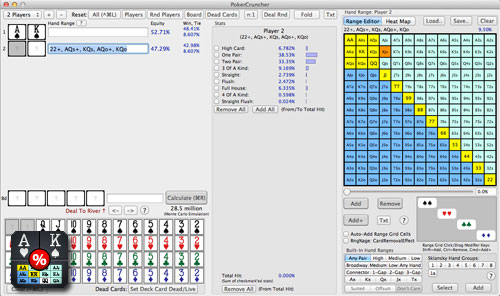
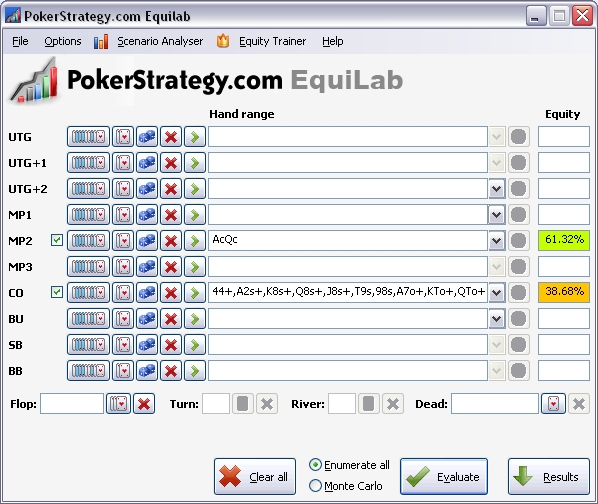
Desktop equity calculators Equilab and PokerStove are both free Windows downloads that go further on hand/range input, while Flopzilla (free version plus a $25 lifetime licence) is the visual heavyweight: range distribution, multiway equity up to 14 players and instant recalculation.
Solvers A different category entirely. Tools like GTO Wizard or PioSolver calculate how you should play a spot; this calculator only tells you how often you win it.
Where it sits The PokerNews tool is the top of the funnel: the fastest, freest answer to a simple probability question, with a clear upgrade path if your study gets deeper. See the full Equity Calculators category.
Poker room rules and restrictions
The official PokerNews page is worth quoting closely here, because the rules genuinely vary by environment:
- Online rooms: each site has its own policy on calculators. Some allow basic odds tools, some prohibit them, and many sit in between. Using any software to inform decisions during a live hand can be treated as Real-Time Assistance (RTA), which is banned at essentially every major room. Check the specific room’s terms before using any tool at the table.
- Live casinos: electronic devices at the table are generally prohibited; using a phone calculator in a live game risks a dead hand, forfeiture or removal.
- Home games: the host and players set the rules — agree before the cards are dealt.
The safe default: use it for study and preparation, never during live play.
Final verdict
Choose it if: you want the fastest free check on a probability, you are building pot-odds intuition, or you need an answer while watching a hand and do not want to open desktop software.
Skip it if: you study in full ranges, you need multiway or Omaha, or you want strategy answers — in that case move to a desktop equity tool or a solver.
FAQs
Is it free? Yes — completely, with no registration or subscription.
Do I need to install anything? No. It runs in the browser.
Can I use it on a phone? Yes, via a mobile browser, with the usual small-screen care when picking cards.
Does it cover Omaha? No — this tool is built for Texas Hold’em.
Is it allowed in online games? It depends on the room’s rules; many treat in-hand calculator use as RTA. Always check the room’s terms, and the safe practice is study-only.
Does it tell me what to do? No. It gives probabilities (the “what”), not decisions (the “should”).
Relevant alternatives
- Equilab review — free desktop equity calculator
- PokerStove review — free classic Windows tool
- Flopzilla review — visual range analysis, $25 lifetime
- GTO Wizard review — when you need strategy, not just odds
- ICMIZER 3 review — for tournament chip-value questions
- Equity Calculators category